
For agencies and freelancers
Stop guessing why your client’s tracking is broken.
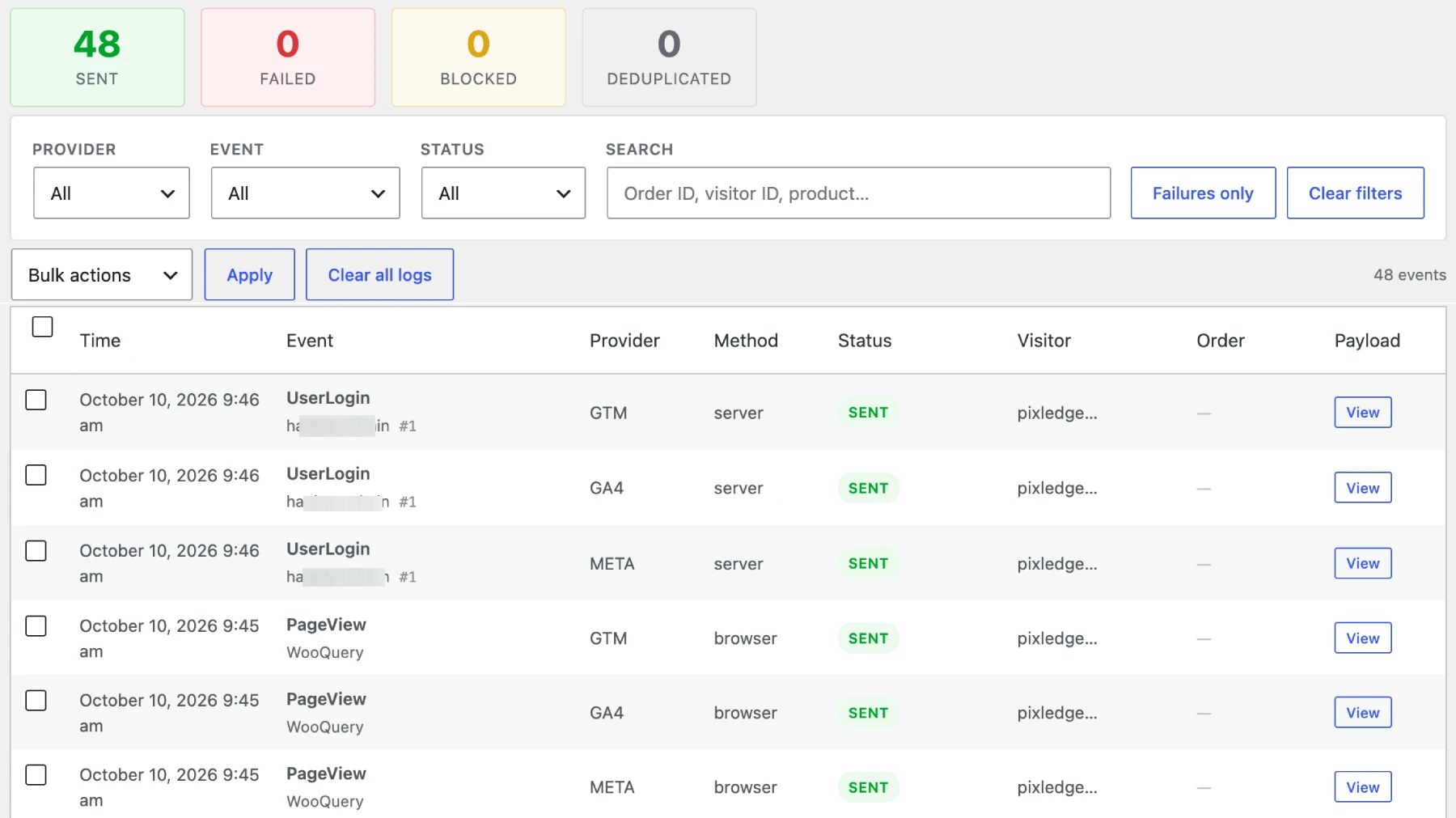
PixLedger puts an Event Log on every store you manage: what was sent to Meta, GA4 and GTM, what failed, and what consent blocked. Free, on any WordPress site.
Free on WordPress.org · No account, no licence key
The usual ticket
“Meta says we have no purchases.”
You get the message, then spend the day finding out who is at fault.
Nothing shows what happened
The pixel loaded, or it did not. The consent banner blocked it, or it did not. Without a record you are guessing.
Everyone points elsewhere
The plugin, the theme, the banner, the ad blocker, the platform. Each one is a possible cause and none leaves a trace.
The client wants proof
“It is fixed” is not an answer. They want to see that the events are leaving the store.
What it gives you
Evidence you can read and show.
Diagnose
Find the cause from the log, not from guesswork.
Place a test order and watch the events arrive. Each row says whether it was sent, failed or blocked, and why.
- Reason on every failed or blocked event
- Filter by provider, event or status
- Search by event name, product or visitor ID

Show
Hand the client something concrete.
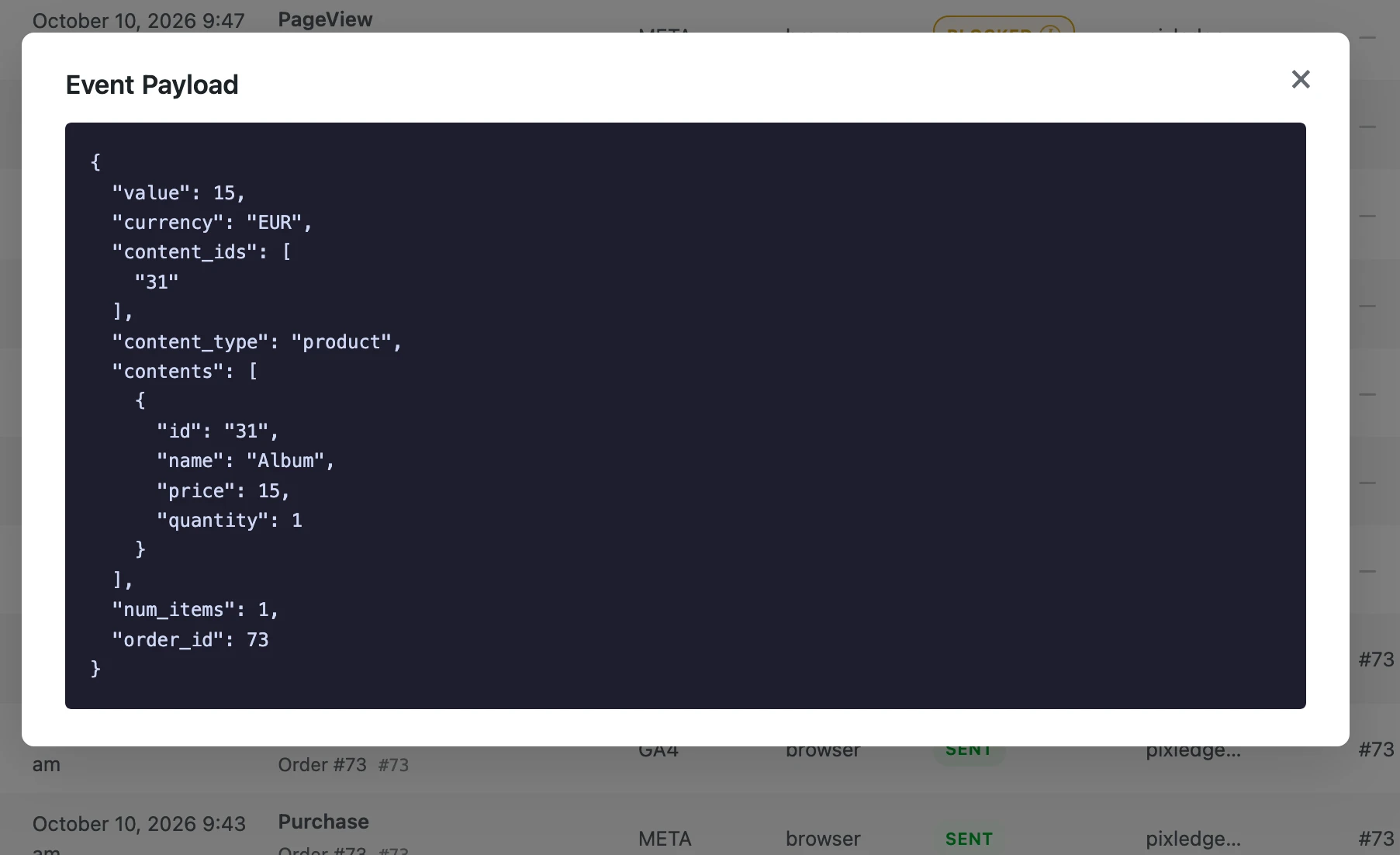
Open a row to see the exact payload PixLedger dispatched to each platform, with the order it belongs to.
- Full JSON payload for every event
- One row per provider, so Meta and GA4 are checked separately
- A calm, readable table you can screenshot for a report
How agencies use it
From install to answer.
Install and connect
Add the plugin, then enter the Meta Pixel ID, GA4 Measurement ID or GTM container ID. Common existing tags are detected so nothing loads twice.
Run a test order
Add to cart, check out, complete the purchase. Every step lands in the Event Log as it happens.
Read the result
Green rows were handed to Meta, GA4 or GTM from the browser. Red or yellow rows tell you what to fix, and you can prove it afterwards.
Safe to roll out
Easy to justify on a client site.
The questions a client’s data protection contact will ask, answered up front.
Data stays on their server
The Event Log lives in the client’s WordPress database. There is no PixLedger account and no external dashboard.
Consent Mode support
With Consent Mode on, events are blocked until the visitor agrees, and the block is logged with the category that denied it.
Hashed customer emails
Email addresses are stored SHA-256 hashed in the log, not in plain text.
Light on the frontend
One small script in the footer batches events.
On the roadmap
Planned for agencies. Not available yet.
These are not in the free version today. If one would change how you work, tell us.
Server-side delivery
Meta Conversions API and GA4 Measurement Protocol, so events survive ad blockers.
Reconciliation
Compare what the platforms report with what WooCommerce actually recorded.
White-label
Your branding instead of ours, for client-facing installs.
Multi-store view
One dashboard across several WordPress installs.
REST API
Read PixLedger data from your own reports and tools.
Role permissions
Decide who on the team can see the log, the settings and exports.
Agency questions.
Can I use it on all my client sites?
Yes. PixLedger is free and open source (GPL-2.0-or-later). There is no site limit and no licence key.
Does the client see the PixLedger name?
In the WordPress admin, yes. A white-label option is on the roadmap but not available yet.
Will it work with my cookie banner?
Only if your banner can pass the visitor’s choice to PixLedger through its consent cookie or a filter. There is no built-in integration with specific banner plugins yet. Check one site first, and ask us if you are unsure.
What if the site already has a Meta, GA4 or GTM tag?
PixLedger detects common tracking plugins and an existing Meta Pixel or GTM container on the page, and skips loading a second copy. A notice in the settings tells you what it found.
Does it need WooCommerce?
No. WooCommerce events load only when WooCommerce is active, so you can use it on any WordPress site.
Does it fix tracking problems by itself?
No. It shows you what happened and why. In the free version events are sent from the browser, so ad blockers can still stop delivery.
Add PixLedger to your next tracking audit.
Install it on one client store and see what your tracking really sends.